Frequently asked questions
Still have a question after this? Contact us.
The basics
What does MyLegacyLivesOn actually do?
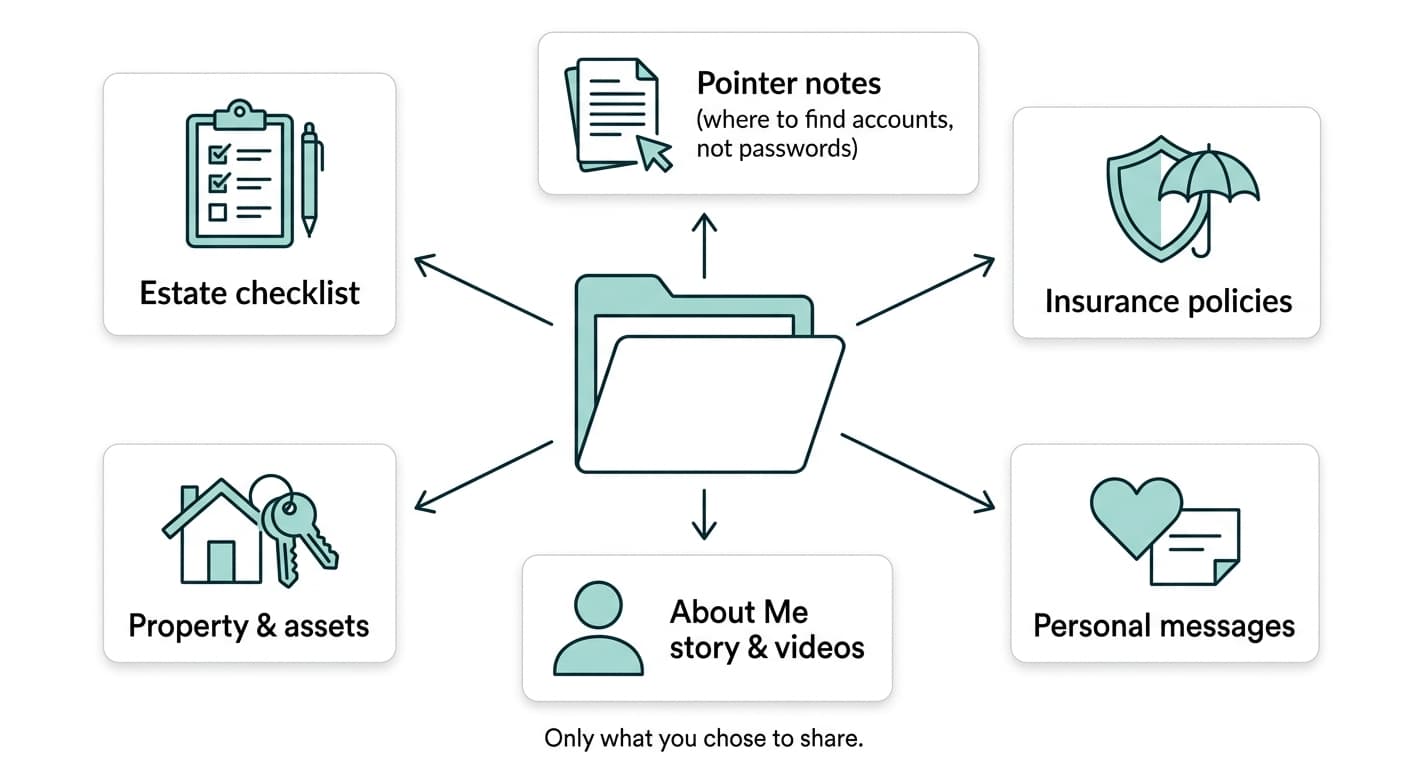
Two things. First, a country-aware checklist that tracks what estate-related steps are outstanding and where important documents and accounts are kept — so your family isn't starting from zero. Second, a private "About Me" story page where you can leave your own words, photos, and video messages for the people who come after you. A check-in safety net ties the two together: if you stop checking in, your next of kin is given access to what you've prepared.
Is this a will, or a substitute for a lawyer?
No. MyLegacyLivesOn doesn't draft legal documents and isn't a law firm. It's a pointer and organizational tool — it tells your family what to do and where to look, based on general guidance for your country. Where you had nothing written down before, you now have a clear starting point; it's not a replacement for a qualified estate lawyer, and we say so throughout the product. See our Disclaimer for the full picture.
How do I get in touch with the team?
Use our contact form — messages go straight to our team, and you'll get an email confirmation once we've received it.
Do you store my passwords, PINs, or ID numbers?
No — and the system actively rejects that kind of input if you try to paste it into a notes or pointer field. MyLegacyLivesOn is a pointer/advisor system, not a password vault: it tells your family where to look, never stores the actual credential. If you choose to ignore the warnings and type sensitive values in anyway, that's outside what the system is designed to hold — keep anything genuinely sensitive on paper or in a dedicated password manager, and use the checklist notes to point to where that is kept.
The check-in safety net
How does the check-in / "dead man's switch" work?
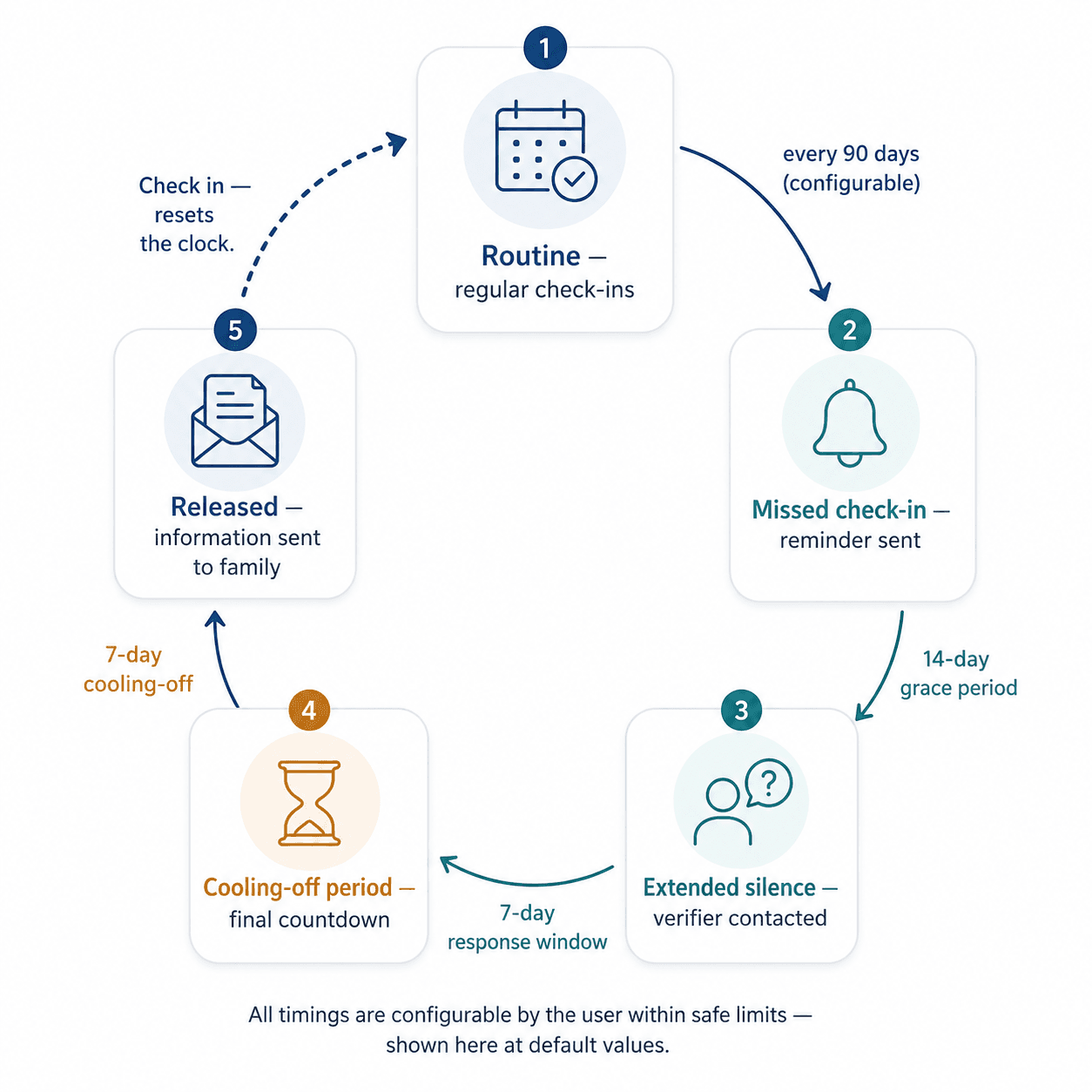
This is a Plus/Legacy feature. You set how often you want to check in (a simple "I'm still here" click from an email, and WhatsApp too). If you miss one, the system moves through a multi-stage escalation — a grace period, then a chance for a designated verifier to confirm you're okay, then a cooling-off period — before anything is released. You can stand it down at any point before the final stage just by signing back in or clicking the confirmation link. On the Free plan, none of this monitoring runs — see below.
What if I just miss a check-in by accident?
On Plus/Legacy, that's exactly what the grace period and verifier stage are for — a single missed reminder doesn't release anything. You control the timing of every stage within safe bounds, so you can set a cadence that fits how often you're realistically reachable.
What do my next of kin actually receive?
On Plus and Legacy: your outstanding checklist items and any pointer notes you've added, plus your story page content and videos if you've chosen to share them — never more than what you've set up to be shared, delivered automatically once the check-in mechanism completes. On the Free plan, the check-in mechanism doesn't run at all, so nothing is ever sent automatically — a next of kin or executor would need to contact us directly with a death certificate to request it.
Pricing & billing
Is the release to my family ever locked behind a paywall?
The whole check-in safety net — not just the final release step — is a Plus/Legacy feature. On either paid plan, we watch for a missed check-in and your next of kin is automatically notified and gets your outstanding checklist and pointer notes if it's ever needed. On the Free plan, none of that monitoring runs — we never check on you and never contact your next of kin automatically for any reason. A next of kin or executor can always reach out to us directly with a death certificate to request your checklist and pointer notes. Upgrading before you need it is the way to make sure that step isn't necessary.
Why does the one-time Legacy plan cost more than a year of Plus?
Because nobody keeps a subscription running after they've died. Free and Plus keep your legacy page live for a set number of years after passing, funded by your account while you're still around to keep it active. Legacy is priced to fund permanent hosting from a single payment made in advance, so it doesn't depend on a card renewing after you're gone. See Pricing for the full breakdown.
What payment methods do you accept?
PayPal, covering major cards without you needing a PayPal account yourself.
The legacy story page
What's the difference between a private story page and the public Wall?
Your About Me page is private by default — only visible to you. You can separately opt in to a direct shareable link, and, on paid plans, to appearing on the public Wall, an aggregated page where legacy stories can be browsed. These are two independent choices, so you decide exactly how visible you want to be, both while you're alive and after.
Can I add videos to my story page?
Yes — link your own YouTube (Unlisted) or Google Drive video, and we store the link. We don't host video files ourselves, so there's no upload limit and you keep control of the original.
Can I get a QR code for a gravestone or memorial plaque?
Yes, on Plus and Legacy plans — once your story page is set to Public, generate a printable QR code from the About Me page that links straight to it. Print it yourself, or download the image to send to an engraver.
Security & trust
How is my data protected?
Passwords are hashed with bcrypt, never stored in plaintext. All database access uses parameterized queries. The site enforces security headers, CSRF protection on every account action, and rate limiting on public-facing endpoints. See our Privacy Policy for the full detail on what we collect and how it's used.
Who can see my checklist and story content?
Only you, until either you explicitly share it (a public story link, the Wall) or the check-in escalation completes and releases it to your designated next of kin. Nobody else — including our team — has a reason to access your content outside of support requests you initiate.
Countries & lawyers
Which countries are supported?
South Africa (our most detailed checklist), the United States, United Kingdom, Canada, Israel, and Australia. You can select more than one if your estate touches multiple countries — your checklist combines guidance across all of them.
Can you connect me with a lawyer?
Our lawyer directory lets you request a referral for the topics that genuinely need a professional (wills, executor matters) — we make the introduction, we don't handle the legal engagement itself.